





Hibiki is ready for your stream.
Download the latest Windows installer and get started.
See the workspace before you open it.
A closer look at the Hibiki workspace — chat, music, moderation and stream tools designed to stay readable while you are live.
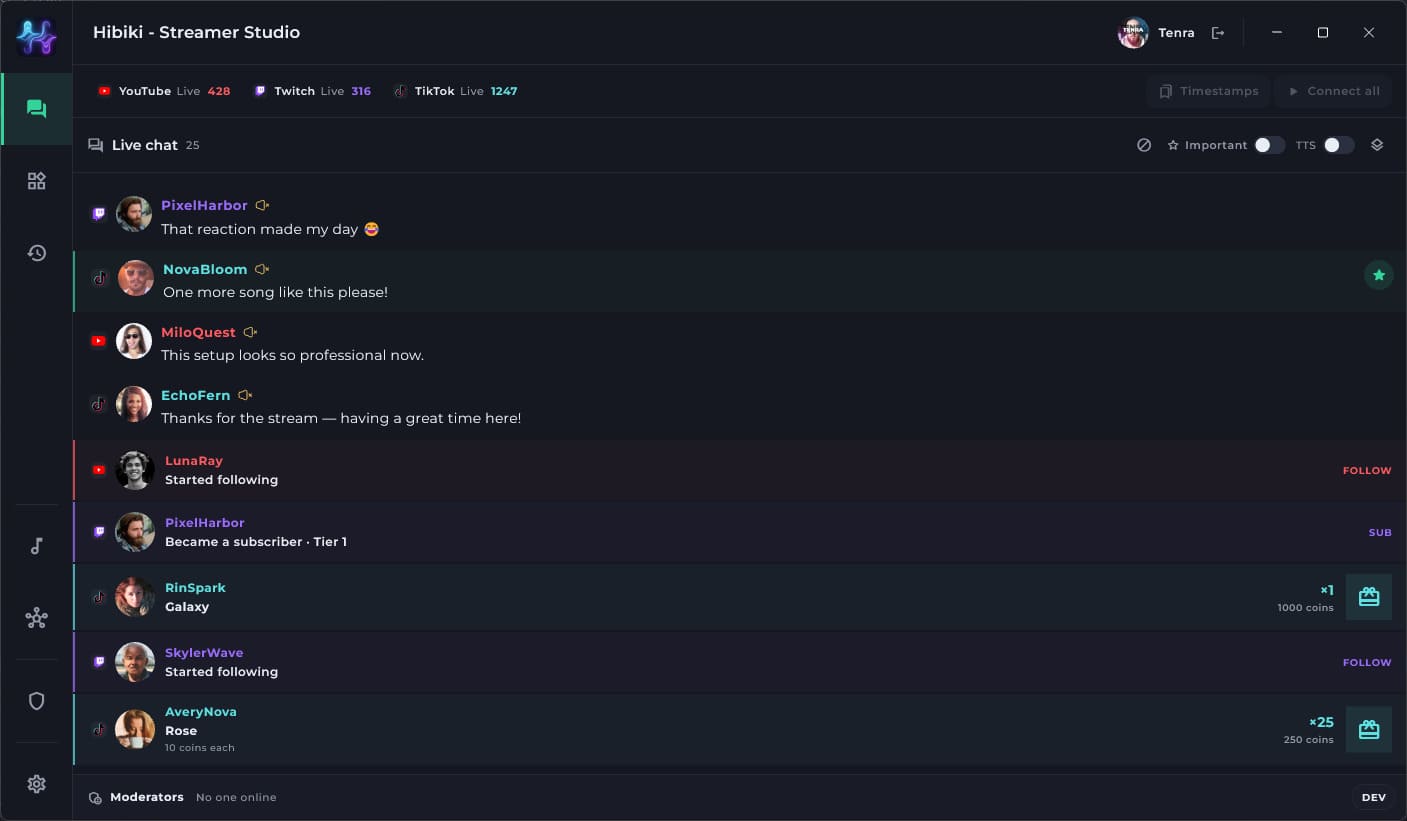
One chat for every stream.
Connect YouTube, Twitch and TikTok and keep the conversation in a single live feed instead of watching three separate dashboards.
Messages stay together while the original platform remains visible at a glance.
Keep your main streaming platforms connected to the same workspace.
Hear the chat without living in it.
Let Hibiki read messages aloud and surface important stream activity while you stay focused on what is happening on screen.
Turn selected chat messages into speech and control what should or should not be read.
Show relevant Twitch and TikTok events together with the rest of the stream activity.
Let moderators run the stream while you stream.
Hibiki includes a separate moderation system for trusted people. They can handle the operational work while the streamer keeps their attention on the audience and the content.
Set clearer display names when a nickname is difficult or inappropriate, and mute users when needed.
Hide or restore stream widgets without interrupting the streamer.
Turn TTS off remotely when the stream needs silence or the chat becomes too noisy.
Temporarily stop music requests when the queue or the moment calls for it.
The same important controls can be used by the streamer or by an authorized moderator.
Save the moment while it is still happening.
When something worth keeping happens, the streamer or a moderator can mark it immediately instead of trying to find it again after the stream.
Mark funny, important or clip-worthy moments without leaving Hibiki.
Keep links back to the corresponding Twitch and YouTube moment so it is easy to review and turn into a video later.
Your stream should not look like everyone else’s.
Hibiki widgets are made to be customized rather than locked into one visual template.
Put the live conversation directly on stream.
Show stream notifications from supported platforms in one visual system.
Surface the most active TikTok likers during the stream.
Keep TikTok donation leaders visible when you want them on screen.
Show what is playing, what is next and who requested it.
Start with a template. Make it completely yours.
Download a test widget template, edit it yourself, or use an AI coding assistant to build the exact presentation you want instead of using the same preset as everyone else.
Change layout, typography, animation and behavior to match your stream identity.
If you can write a template — or describe one to an AI tool — Hibiki can become the presentation layer you actually want.
One queue across the music you already use.
Viewers can request tracks while Hibiki keeps playback and the queue together across supported providers.
Keep familiar services available without splitting the request flow.
Use regional providers in the same shared queue and playback experience.
Miss the chat for a minute. Not the conversation.
Let AI periodically summarize what happened in chat so you can catch up without reading every line or listening to constant TTS.
Generate a recap after a chosen amount of time.
Or summarize after a selected number of chat messages when conversation gets busy.